

A VPN does protect you on public Wi-Fi, and for most people that’s the single best reason to use one. Public Wi-Fi is everywhere: coffee shops, airports, hotels, libraries. It’s also one of the easiest places for someone to intercept your internet traffic, often without you knowing.
This guide covers what a VPN is, what it protects you from on public Wi-Fi, and where its limits are.
Table of Contents
What Is a VPN?
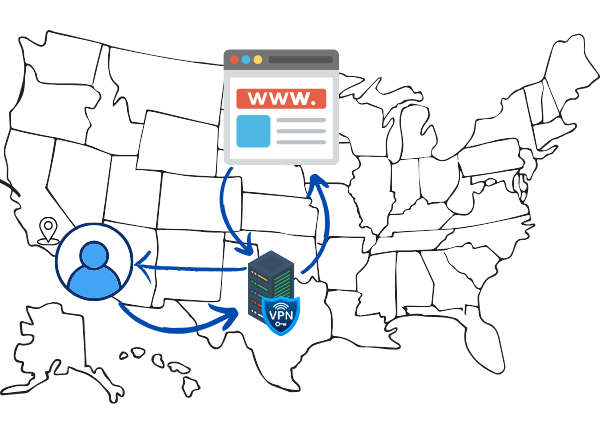
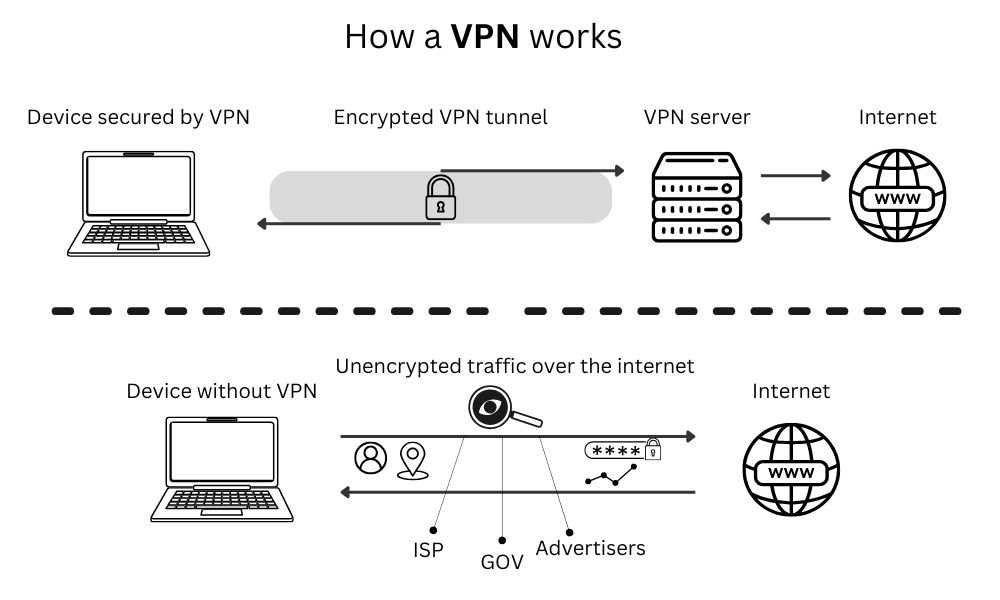
A VPN (short for Virtual Private Network) creates an encrypted connection between your device and the internet. Instead of your traffic going straight to whatever website or app you’re using, it first passes through a VPN server. That server acts as a middleman: websites see the server’s location and IP address, not yours.
The encryption part is what matters most on public Wi-Fi. Anyone on the same network, including whoever is running it, can potentially intercept unencrypted traffic. A VPN scrambles that data so it’s unreadable, even if someone manages to grab it.
Does a VPN Protect You on Public Wi-Fi?
Yes, and this is where a VPN earns its keep most clearly.
On an open Wi-Fi network, your traffic travels without any built-in protection. Someone using freely available tools can position themselves between your device and the router, capturing the data flowing through. This type of attack is known as a man-in-the-middle attack, and it’s more common on public networks than most people realise. The FBI has warned about the risks of using public Wi-Fi, particularly in hotels where remote workers connect without taking precautions.
A VPN closes that gap. Your data is encrypted before it ever leaves your device, so even if it’s intercepted, it’s just garbled noise to whoever grabbed it.
Specific things a VPN protects on public Wi-Fi:
- Passwords entered on websites that don’t use HTTPS
- Emails and messages sent through unencrypted apps
- The list of sites and services you’re connecting to
- Any data sent or received while connected
If you regularly work from cafes, use hotel Wi-Fi while travelling, or connect at airports, a VPN is worth running by default.
What Does a VPN Hide?
Beyond public Wi-Fi, a VPN hides several things in your everyday browsing:
Your IP address
Websites you visit see the VPN server’s IP address, not your own. This makes it harder to track your location or build a profile based on where your traffic comes from.
Your browsing activity from your ISP
Your internet service provider can normally see every site you visit. With a VPN running, they can see that you’re connected to a VPN server, but not what you’re doing through it.
Your traffic from other devices on your network
On shared networks (whether public or a shared home connection), a VPN prevents other devices from seeing what you’re up to.
Use our tool to check your IP & location
What Does a VPN Protect You From?
A VPN is most useful against three specific threats:
1. Snooping on shared networks
This is the most practical reason most people use a VPN.
2. ISP tracking and data collection
In many countries, ISPs are allowed to log and sell your browsing data. A VPN prevents them from seeing the content of your traffic, limiting what they can collect. The Electronic Frontier Foundation has documented how ISP data collection affects everyday users.
3. Basic location tracking
Websites and ad networks use your IP address to estimate your location. A VPN replaces your IP with the server’s, making that tracking less accurate.
What a VPN Doesn’t Protect You From
This part matters just as much.
Tracking through accounts and cookies
If you’re logged into Google, Facebook, or any other service, those platforms know who you are regardless of your VPN. They track through your account, not just your IP. A VPN won’t stop that.
Malware and phishing
A VPN encrypts your traffic but doesn’t scan it. If you download a malicious file or click a phishing link, the VPN won’t intervene. You still need a solid antivirus for that.
Everything on your device
The VPN only covers traffic going out through your internet connection. It doesn’t protect files on your device or prevent apps from accessing your data locally.
The VPN provider itself
When you use a VPN, you’re routing your traffic through someone else’s server. A trustworthy provider with a verified no-logs policy is essential. Without one, you’ve just moved the privacy problem from your ISP to your VPN company.
Do I Need a VPN at Home?
The public Wi-Fi risk doesn’t apply on your home network, so the case for a VPN at home is different. It comes down to whether you care about any of these:
- ISP tracking: if you’d rather your internet provider not see your browsing habits, a VPN is the simplest solution
- IP-based location tracking: some people prefer that websites can’t pinpoint their rough location from their IP address
- Accessing geo-restricted content: streaming services and some websites show different content depending on where you are, and a VPN lets you connect through a server in another country
If none of those bother you and you’re on a private home network, a VPN at home is useful but not urgent. On public Wi-Fi, the calculation is different. The risk is real and a VPN directly addresses it.
Can Your ISP See Your VPN?
Yes, but only partially. Your ISP can tell that you’re connected to a VPN server; the connection itself is visible. What they can’t see is the content of that connection: which sites you visit, what you download, or what you search for.
Think of it like a sealed envelope. The post office knows you sent a letter somewhere, but they can’t read what’s inside.
Is a VPN Safe to Use?
A reputable VPN is safe and legitimate. The main safety consideration is choosing the right provider. Look for:
- An independently audited no-logs policy (this means a third party has verified the provider doesn’t store records of your activity)
- A clear privacy policy with no data-selling clauses
- A known track record. Established providers like Mullvad, ProtonVPN, or ExpressVPN have been scrutinised publicly and held up well
Free VPNs are where things get risky. Several well-known free VPN apps have been caught logging user data, injecting ads into web traffic, or selling user bandwidth. If cost is a concern, ProtonVPN’s free tier is a safer option than most. It’s run by the same organisation behind ProtonMail and has a legitimate no-logs policy.
One practical note on speed: a VPN adds a small amount of overhead since your traffic is being encrypted and rerouted. You can measure the impact on your connection using a tool like Speedtest by Ookla before and after connecting.
Frequently Asked Questions
Does a VPN protect you on public Wi-Fi?
Yes. It encrypts your traffic so that anyone else on the same network, including the network operator, can’t read your data. This is the single most practical reason to use a VPN.
What does a VPN hide?
A VPN hides your IP address, your browsing activity from your ISP, and your traffic from others on the same network. It does not hide your activity from services you’re logged into.
Can my ISP see my VPN?
They can see that you’re connected to a VPN, but not what you’re doing through it. The content of your traffic is encrypted.
What does a VPN protect you from?
Snooping on public or shared networks, ISP data collection, and basic IP-based location tracking. It doesn’t protect against malware, phishing, or tracking through cookies and logged-in accounts.
Do I need a VPN at home?
Not urgently, unless you want to stop your ISP from tracking your browsing or access content from other countries. Unsecured public Wi-Fi is the main risk that makes VPNs worthwhile, and that doesn’t apply on a private home network.
Is a VPN safe to use?
Yes, if you choose a reputable provider. Stick with established names that have independently audited no-logs policies. Avoid obscure free VPNs, as many have been caught logging or selling user data.
The Bottom Line
A VPN is genuinely useful, especially on public Wi-Fi, where the risk is most immediate and the protection most direct. It encrypts your traffic, hides your browsing from your ISP, and masks your IP address from websites.
What it isn’t is a complete privacy solution. It won’t stop tracking through your Google or Facebook accounts, won’t block malware, and is only as trustworthy as the company running the servers.
For anyone who regularly uses public Wi-Fi or just wants a bit more control over who can see their internet activity, it’s a practical and affordable tool. Pick a provider with a clean privacy track record, and you’re covered for the threats it’s actually designed to handle.


